
Amazon MCF and Buy with Prime Accelerator for NetSuite OMS
Buy with Prime API is now available for early access
Sign up for early access to the Buy with Prime API using the 'Sign Up' button below. The API may change as Amazon receives feedback and iterates on it.
You can use the Amazon MCF and Buy with Prime Accelerator for NetSuite OMS to integrate Multi-Channel Fulfillment (MCF) and Buy with Prime with your NetSuite order management system (OMS). The following sections describe the technical requirements, solution architecture, implementation modules, and deployment considerations for the accelerator.
Accelerator benefits
The Amazon MCF and Buy with Prime Accelerator for NetSuite reduces integration time and technical complexity while automating synchronization of business data. You can use the accelerator to implement Amazon commerce capabilities without extensive modifications to your existing inventory management, order processing, fulfillment tracking, and returns handling systems. This approach lets development teams focus on merchant-specific customizations instead of building core integration components.
Solution overview
The Amazon MCF and Buy with Prime Accelerator for NetSuite OMS processes data asynchronously without disrupting your existing NetSuite OMS operations. The accelerator manages data transformations and maintains state consistency between Amazon services and your OMS, adding Amazon fulfillment capabilities while preserving existing workflows.
The accelerator provides integration with Amazon Buy with Prime APIs, which also support MCF. The accelerator is hosted within your existing NetSuite account where you manage your OMS and Inventory Management System (IMS). Merchants using NetSuite as their primary Order Management System can leverage this accelerator irrespective of their storefront technology stack.
Use cases
The following table describes several use cases for the Amazon MCF and Buy with Prime Accelerator for NetSuite OMS:
| Use case | From | To | Description |
|---|---|---|---|
| Fulfill with Amazon | OMS | Amazon | Create and manage MCF and Buy with Prime orders from NetSuite OMS. |
| Amazon Fulfillment Updates | Amazon | OMS | Update your NetSuite OMS with delivery cancellations, delivery failures, shipping, and tracking info from Amazon. |
| Order cancels through Amazon | Amazon | OMS | Update NetSuite OMS with order cancel information from Amazon. |
| Order cancels outside Amazon | OMS | Amazon | Update Amazon with order cancel information from NetSuite OMS. |
| Returns through Amazon | Amazon | OMS | Handle returns initiated from Amazon, create return authorizations in NetSuite OMS, and sync return delivery status. |
| Returns outside Amazon | OMS | Amazon | Sync merchant-initiated returns with Amazon and maintain return visibility. |
| Amazon refund requests | Amazon | OMS | Process refund requests initiated from Amazon due to delivery cancellations, delivery failures, and returns. |
| Synchronize issued refunds | OMS | Amazon | Send refund updates from OMS to Amazon to ensure synchronized status. |
| Synchronize inventory | Amazon | OMS | Sync inventory in real-time and batch from Amazon to NetSuite OMS to maintain accurate stock levels. |
Because the accelerator integrates with Buy with Prime APIs rather than MCF Seller Partner APIs, it does not support certain MCF features including fulfillment policies, blank box shipping, and the ability to block Amazon Logistics (AMZL).
Design principles and technical architecture
Integration principles
The Amazon MCF and Buy with Prime Accelerator for NetSuite OMS uses principles such as keeping client systems authoritative, maintaining system boundaries, and using asynchronous, event-driven communication. The integration uses webhook-based and scheduled event processing to enable real-time updates without tight coupling between systems. All external communications follow NetSuite Token-Based Authentication (TBA) and Amazon OAuth 2.0, with data encrypted in transit using TLS 1.2 and later.
Architecture layers
The Amazon MCF and Buy with Prime Accelerator for NetSuite OMS uses three distinct architectural layers:
-
Amazon Connector layer: Handles technical connectivity and data mapping between Amazon and NetSuite OMS formats.
-
Integration Services layer: Handles business logic and orchestration across modules including Inventory, Orders, Cancellation, Returns and Refunds, and Package Tracking.
-
NetSuite Event Handler layer: Provides validation and routing logic. You deploy the NetSuite Event Handler layer within your NetSuite account to identify and direct Amazon orders to the accelerator's Integration Services. This layer serves as a reference implementation that you can configure or extend based on your requirements.
Event processing architecture
The architecture of the accelerator uses asynchronous event processing to reduce system coupling and increase scalability.
-
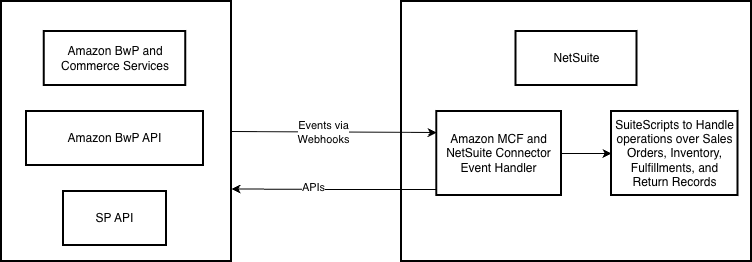
Amazon to NetSuite OMS: Webhooks send Amazon events to NetSuite RESTlets, which validate and transform data. The Integration Services layer processes these events asynchronously, maintains OMS state, and coordinates Amazon responses. NetSuite OMS uses Token-Based Authentication (TBA) for security. The accelerator processes JSON-based Amazon events and communicates with NetSuite OMS using SuiteScript events and RESTlets.
-
NetSuite OMS to Amazon: The accelerator validates NetSuite OMS transaction events for Amazon orders. The Integration Services layer processes these events asynchronously, maintains Amazon state, and coordinates OMS responses. Access to Amazon services requires OAuth-based authentication. The accelerator communicates with Amazon services using Buy with Prime APIs and Seller Partner APIs.
NetSuite OMS platform integration
The accelerator design aligns with the NetSuite OMS order lifecycle transactions, events, and processing pipeline. This design principle supports integration with your existing OMS implementation and reduces customization requirements. The architecture uses established NetSuite OMS mechanisms for order processing, fulfillment, and inventory management.
Accelerator configuration
The Amazon MCF and Buy with Prime Accelerator for NetSuite OMS lets you configure properties to change the behavior of the accelerator based on your business needs and account setup. You can modify these properties using API calls or manually modify them with the NetSuite Application Manager.
Implementation modules
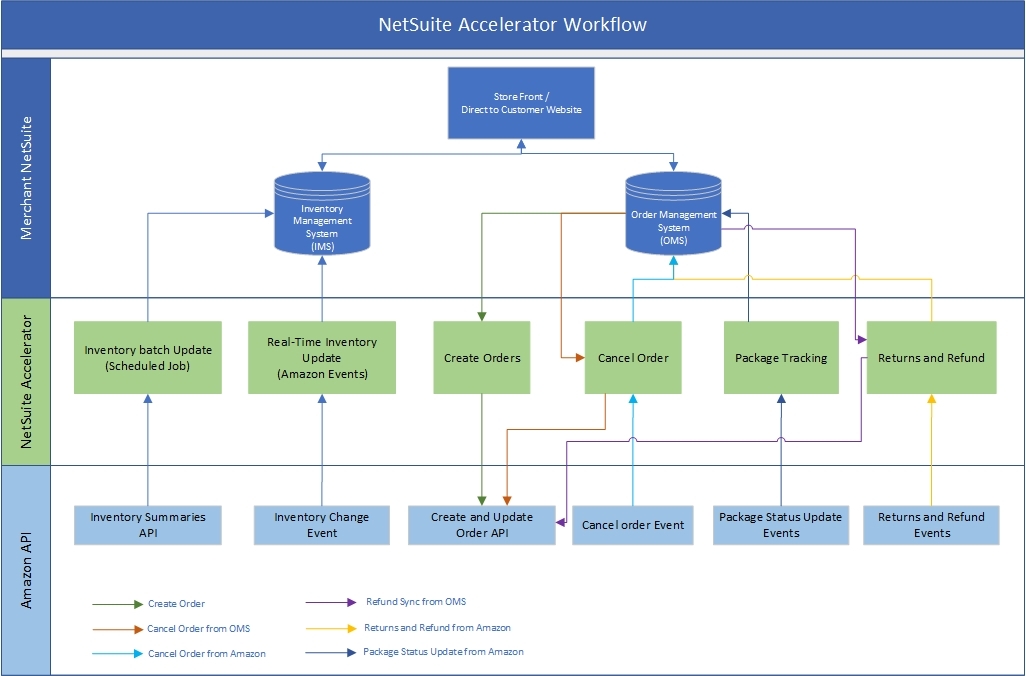
The Amazon MCF and Buy with Prime Accelerator for NetSuite OMS uses several modules to integrate Amazon services with NetSuite OMS. These modules handle order management, fulfillment, returns processing, refund management, cancellations, and inventory synchronization. Each module uses specific APIs and event triggers to maintain data consistency between systems.
Fulfill with Amazon
The fulfillment order creation module creates orders in Amazon immediately after a new order is created in NetSuite OMS with Buy with Prime or MCF line items. When a sales order is created in NetSuite OMS, the accelerator automatically validates the order for Buy with Prime or MCF items and performs a create order API call to Amazon. The accelerator updates the NetSuite OMS sales order with the corresponding Amazon order ID based on the create order API response from Amazon.
The following table lists fulfillment APIs and events:
| Component Type | Name | Purpose |
|---|---|---|
| Amazon APIs | mutation: createOrder | Creates new order in Amazon. |
mutation: updateOrder | Updates order status. | |
| Amazon Events | N/A | - |
| NetSuite OMS Script | AMZ UE Manage Order | Create order in Amazon; update order in Amazon. |
Amazon fulfillment updates
The fulfillment status update component provides real-time visibility into the order delivery lifecycle by processing event-based status updates from Amazon for package in-transit notifications, delivery confirmations, package location milestones, delivery attempts and failures, lost package notifications, and cancellations during transit. Once Amazon begins fulfilling an order, the accelerator automatically updates the corresponding Item Fulfillment record in NetSuite OMS with the latest delivery status and tracking details received from Amazon.
The event flow begins with Amazon sending fulfillment events through webhook to the NetSuite OMS endpoint, where the accelerator validates and transforms the payload and maps Amazon fulfillment milestones (such as IN_TRANSIT and DELIVERED) to NetSuite OMS fields and statuses. The NetSuite OMS layer then updates the fulfillment record with tracking numbers, carrier details, current package location, delivery attempt or failure details, and final delivery confirmation status. After the fulfillment record is updated, your NetSuite OMS environment can trigger post-processing activities through workflows or user events for shipment invoices, processing payments, posting financial records, and initiating shopper notifications.
The following table lists shipment and delivery APIs and events:
| Component Type | Name | Purpose |
|---|---|---|
| Amazon APIs | query: order | Retrieves delivery/package details. |
| Amazon Events | PACKAGE_DELIVERY_IN_TRANSIT | Indicates shipment started. |
PACKAGE_TRACKER_MILESTONE_CHANGED | Tracking number updated. | |
PACKAGE_DELIVERED | Confirms delivery completion. | |
| NetSuite Restlet | AMZ RT Event Entry | Process delivery changes. |
| NetSuite Script | AMZ UE Manage Fulfillment | createFulfillment; updateFulfillment. |
The following table lists delivery cancellation and delivery failure APIs and events:
| Component Type | Name | Purpose |
|---|---|---|
| Amazon APIs | query: order | Retrieves delivery/package details. |
| Amazon Events | PACKAGE_DELIVERY_CANCELLED | Indicates delivery cancellation. |
PACKAGE_DELIVERY_FAILURE | Indicates delivery failures. | |
| NetSuite Restlet | AMZ RT Event Entry | Process delivery changes. |
| NetSuite Script | AMZ UE Cancel Order | CancelOrder. |
Returns through Amazon
This module manages returns initiated from Amazon's Online Returns Center or Buy with Prime shopper order details page. The module automatically creates and manages return records in NetSuite OMS to ensure real-time visibility and consistent returns status synchronization. When a shopper initiates a return through Amazon's portal, Amazon sends a return created event via secure webhook to the merchant's NetSuite RESTlet. The accelerator authenticates and validates the payload, maps Amazon return details including order ID, ASIN/SKU, quantity, reason code, and return tracking to NetSuite OMS structures, and creates a Return Authorization record linked to the corresponding Sales Order.
As Amazon provides return delivery status updates such as in-transit, received, graded, refund requested, or closed, these events are captured and applied to the Return Authorization in NetSuite OMS. This enables downstream processing where NetSuite OMS can automatically generate credit memos or refunds, trigger workflows to notify finance, warehouse, or shopper service teams, and allow merchants to reconcile return inventory and settlement reports.
The following table lists Amazon return APIs and events:
| Component Type | Name | Purpose |
|---|---|---|
| Amazon APIs | query: order | Retrieves return details. |
| Amazon Events | RETURN_STARTED | Indicates return initiation. |
RETURN_PACKAGE_IN_TRANSIT | Updates return shipment status. | |
RETURN_PACKAGE_DELIVERED | Confirms return delivery. | |
RETURN_ITEM_GRADED | Updates return item inspection status. | |
RETURN_COMPLETED | Indicates return completion. | |
| NetSuite Restlet | AMZ RT Event Entry | Updates NetSuite Return status. |
| NetSuite Script | AMZ UE Manage Return Authorization | createReturn; updateReturnPackage. |
Returns outside Amazon
This module manages returns initiated through channels other than Amazon such as your NetSuite customer service portal, point of sale, or internal return workflows. The module ensures Amazon is notified of all return activities to prevent duplicate authorization and maintain consistent return visibility across both NetSuite OMS and Amazon. When a return is initiated manually or programmatically within NetSuite OMS, the accelerator identifies the return as being associated with an Amazon order, transforms the return data into Amazon's required format including order identifiers, item details, quantities, and return reasons, and submits a return creation request to the Buy with Prime API.
The following table lists external return APIs and events:
| Component Type | Name | Purpose |
|---|---|---|
| Amazon APIs | mutation: updateOrder | Creates or updates return in Amazon. |
| NetSuite Script | AMZ UE Manage Return Authorization | createReturnOnAmazon. |
Amazon refund requests
This module manages refund notifications initiated by Amazon for successful shopper returns, order cancellations after payment, and delivery failures or lost packages. The module ensures that refund events are automatically processed in NetSuite OMS to keep financial records and shopper transactions synchronized. When Amazon triggers a refund notification through a webhook, the accelerator authenticates and validates the incoming event, maps the Amazon order and item details to the corresponding NetSuite OMS transaction, determines the appropriate refund amount and tax components, and automatically creates the corresponding financial transaction (such as a Credit Memo for returns and delivery failures or a Return Invoice) linked to the original Sales Order.
After the refund transaction is created, standard NetSuite OMS workflows or payment gateway integrations execute the actual payment refund. Refund details are logged in the AMZ Audit Log for traceability and reconciliation. Merchants can optionally trigger notifications to shoppers or finance teams.
The following table lists refund request APIs and events:
| Component Type | Name | Purpose |
|---|---|---|
| Amazon APIs | mutation: updateOrder | Updates refund status in Amazon. |
query: order | Query refund details. | |
| Amazon Events | REFUND_REQUESTED | Triggers refund processing. |
| NetSuite Restlet | AMZ RT Event Entry | Creates refund on NetSuite OMS. |
| NetSuite Script | AMZ UE Manage Refund | createRefund; updateRefund. |
Synchronize issued refunds
This module manages refunds initiated in NetSuite OMS and ensures that Amazon is updated with accurate refund status and details after a refund payment is processed and completed within NetSuite OMS. When a refund transaction is created in NetSuite OMS due to shopper return processing, order cancellation after invoicing, or manual refund adjustments, the accelerator automatically detects the refund event and validates its association with an Amazon order. The accelerator retrieves the corresponding Amazon Order ID and Refund Mapping data, and sends the refund confirmation to Amazon through the Amazon Buy with Prime order update API.
The following table lists refund synchronization APIs and events:
| Component Type | Name | Purpose |
|---|---|---|
| Amazon APIs | mutation: updateOrder | Updates refund status in Amazon. |
| NetSuite Script | AMZ UE Manage Refund | createRefund; updateRefund. |
Merchant order cancellation
You can initiate cancellation of Buy with Prime or Multi-Channel Fulfillment (MCF) orders directly from NetSuite OMS or other connected merchant systems for reasons such as order cancellation, out-of-stock items, payment failures, or manual administrative actions. The accelerator ensures that valid cancellation requests are validated, transmitted, and synchronized between NetSuite OMS and Amazon to maintain transactional accuracy.
When a cancellation is initiated in NetSuite OMS, the accelerator validates the request by identifying eligible orders in "Pending Fulfillment" status that have not yet been shipped. It links the cancellation to an Amazon order, extracts order identifiers and reason codes, and confirms no conflicting fulfillment or refund events are in progress before communicating the cancellation request to Amazon through the Amazon order cancellation API. After receiving Amazon's response—accepted, partially accepted, or rejected—the accelerator updates the order status and related records in NetSuite OMS to reflect the final cancellation state. All API request and response details are stored in the Audit Log for traceability and reconciliation. The accelerator triggers error notifications and retry logic for any failed or partial cancellations.
The following table lists order cancellation APIs and events:
| Component Type | Name | Purpose |
|---|---|---|
| Amazon APIs | mutation: cancelOrder | Request to cancel Amazon order. |
| NetSuite Script | AMZ UE Cancel Order | cancelOrder; updateOrder. |
Synchronize inventory
The inventory management module ensures inventory alignment between Amazon and NetSuite OMS for MCF and Buy with Prime operations. The module automatically updates NetSuite OMS with Amazon's latest inventory levels through two complementary mechanisms: real-time inventory updates triggered by Amazon events when stock levels change, and scheduled full synchronization that periodically retrieves complete inventory snapshots from Amazon to ensure data consistency. By maintaining up-to-date inventory information, merchants can reduce overselling, optimize fulfillment accuracy, and improve shopper satisfaction.
When Amazon triggers an inventory update event due to stock changes in its fulfillment centers from sales, returns, or restocks, the accelerator receives and validates the event payload. It matches the incoming Amazon SKU or ASIN with the corresponding NetSuite OMS item and normalizes inventory data to NetSuite's structure. The accelerator updates the corresponding item record in NetSuite OMS by adjusting available quantities and location-specific inventory levels. It records the transaction as an Inventory Adjustment or Bin Transfer and flags it as originating from Amazon for audit purposes.
Additionally, the accelerator runs a scheduled batch process to reconcile full inventory data. The process retrieves complete inventory snapshots from Amazon at defined intervals, compares Amazon's data with NetSuite's records to correct any mismatches, and ensures NetSuite OMS reflects the true available-to-sell quantities across all connected fulfillment centers.
The following table lists real-time inventory APIs and events:
| Component Type | Name | Purpose |
|---|---|---|
| Amazon APIs | getInventorySummaries | Get fulfillable quantity for seller SKU. |
| Amazon Events | INVENTORY_CHANGED | Triggered on inventory availability change. |
| NetSuite Restlet | AMZ RT Event Entry | Adjust inventory on NetSuite OMS. |
| NetSuite Script | AMZ UE Process Event | adjustInventory. |
The following table lists periodic inventory synchronization APIs:
| Component Type | Name | Purpose |
|---|---|---|
| Amazon APIs | getInventorySummaries | Get fulfillable quantity for seller SKU. |
query: Products | Get external ID for seller SKU. | |
| NetSuite Script | AMZ MR Inventory Sync | adjustInventory. |
Installation and deployment overview
Prerequisites
The installation process requires a functioning NetSuite OMS environment with SuiteCloud Platform capabilities including SuiteCloud Developer Tools, SuiteScript 2.0, and RESTlet features. You need administrator or integration role permissions, API credentials for Amazon Selling Partner API (SP-API) and Buy with Prime GraphQL API, defined subsidiaries and locations in NetSuite, and configured roles for integration users. The accelerator supports deployment in both NetSuite production and sandbox environments.
Deployment
Deploy the accelerator using the following approach:
- Install the accelerator bundle in a NetSuite sandbox environment.
- Configure accelerator settings such as API endpoints, tokens, and merchant preferences in the AMZ Accelerator configuration record.
- Validate integration flows, including order synchronization, fulfillment, inventory, returns, and refund updates.
- Identify configuration gaps, field mapping issues, or script governance adjustments needed for production deployment.
- Migrate validated configurations and custom records to the production account.
- Reconnect to live Amazon APIs using production credentials.
- Enable real-time event listeners and scheduled Map/Reduce scripts for production data synchronization.
- Conduct final end-to-end testing to confirm data accuracy and performance alignment with merchant operational requirements.
The implementation spans multiple layers, including SuiteScript deployment with User Event, Map/Reduce, and RESTlet scripts, configuration setup for module-specific settings, integration setup for mapping NetSuite records to Amazon identifiers, and merchant customization for business-specific parameters and notifications.
Related topics
Updated 9 months ago