
Amazon MCF and Buy with Prime Accelerator for SAP S/4HANA OMS
Buy with Prime API is now available for early access
Sign up for early access to the Buy with Prime API using the 'Sign Up' button below. The API may change as Amazon receives feedback and iterates on it.
Use the Amazon MCF and Buy with Prime Accelerator for SAP S/4HANA OMS to integrate Multi-Channel Fulfillment (MCF) and Buy with Prime with your SAP S/4HANA order management system (OMS). The following sections describe the technical requirements, solution architecture, implementation modules, and deployment considerations for the accelerator.
Accelerator benefits
The Amazon MCF and Buy with Prime Accelerator for SAP S/4HANA reduces integration time and technical complexity while automatically syncing business data. Use the accelerator to implement Amazon commerce capabilities without extensive modifications to your existing inventory management, order processing, fulfillment tracking, and returns handling systems. This approach lets development teams focus on merchant-specific customizations instead of building core integration components.
Solution overview
The Amazon MCF and Buy with Prime Accelerator for SAP S/4HANA OMS processes data asynchronously without disrupting your existing SAP S/4HANA OMS operations. The accelerator transforms data and maintains state consistency between Amazon services and your OMS, adding Amazon fulfillment capabilities while preserving existing workflows.
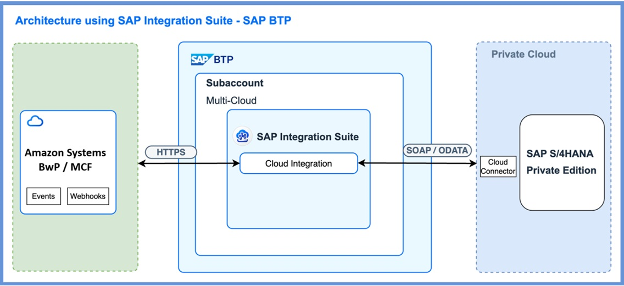
The accelerator provides integration with Amazon Buy with Prime APIs, which also support MCF. It is hosted within your existing SAP S/4HANA private cloud account where you manage your OMS and Inventory Management System (IMS). Merchants using SAP S/4HANA as their primary OMS can use this accelerator regardless of their storefront technology stack.
Use cases
The following table describes several use cases for the Amazon MCF and Buy with Prime Accelerator for SAP S/4HANA OMS:
| Use case | From | To | Description |
|---|---|---|---|
| Fulfill with Amazon | OMS | Amazon | Create and manage MCF and Buy with Prime orders from SAP S/4HANA OMS. |
| Amazon Fulfillment Updates | Amazon | OMS | Update SAP S/4HANA OMS with delivery cancellations, delivery failures, shipping, and tracking information from Amazon. |
| Order cancellations through Amazon | Amazon | OMS | Update SAP S/4HANA OMS with order cancellation information from Amazon. |
| Order cancellations outside Amazon | OMS | Amazon | Update Amazon with order cancellation information from SAP S/4HANA OMS. |
| Returns through Amazon | Amazon | OMS | Handle returns initiated from Amazon, create return authorizations in SAP S/4HANA OMS, and sync return delivery status. |
| Returns outside Amazon | OMS | Amazon | Sync merchant-initiated returns with Amazon and maintain return visibility. |
| Amazon refund requests | Amazon | OMS | Process refund requests initiated from Amazon due to delivery cancellations, delivery failures, and returns. |
| Synchronize issued refunds | OMS | Amazon | Send refund updates from OMS to Amazon to ensure synchronized status. |
| Synchronize inventory | Amazon | OMS | Sync inventory in real-time and batch from Amazon to SAP S/4HANA OMS to maintain accurate stock levels. |
Because the accelerator integrates with Buy with Prime APIs rather than MCF Seller Partner APIs, it does not support certain MCF features including fulfillment policies, blank box shipping, and the ability to block Amazon Logistics (AMZL).
Implementation modules
The Amazon MCF and Buy with Prime Accelerator for SAP S/4HANA OMS consists of eight core SAP iFlow functional modules that work together to integrate Amazon's fulfillment services with SAP S/4HANA. Each module corresponds to a key part of the inventory and order lifecycle, including order management, fulfillment, returns, refunds, cancellations, and inventory synchronization. The modules use Amazon's Buy with Prime GraphQL APIs, Amazon Notifications and Selling Partner REST APIs (Inventory), combined with SAP iFlows for individual modules and Groovy Scripts, to maintain real-time data consistency between both systems.
Create Amazon fulfillment order
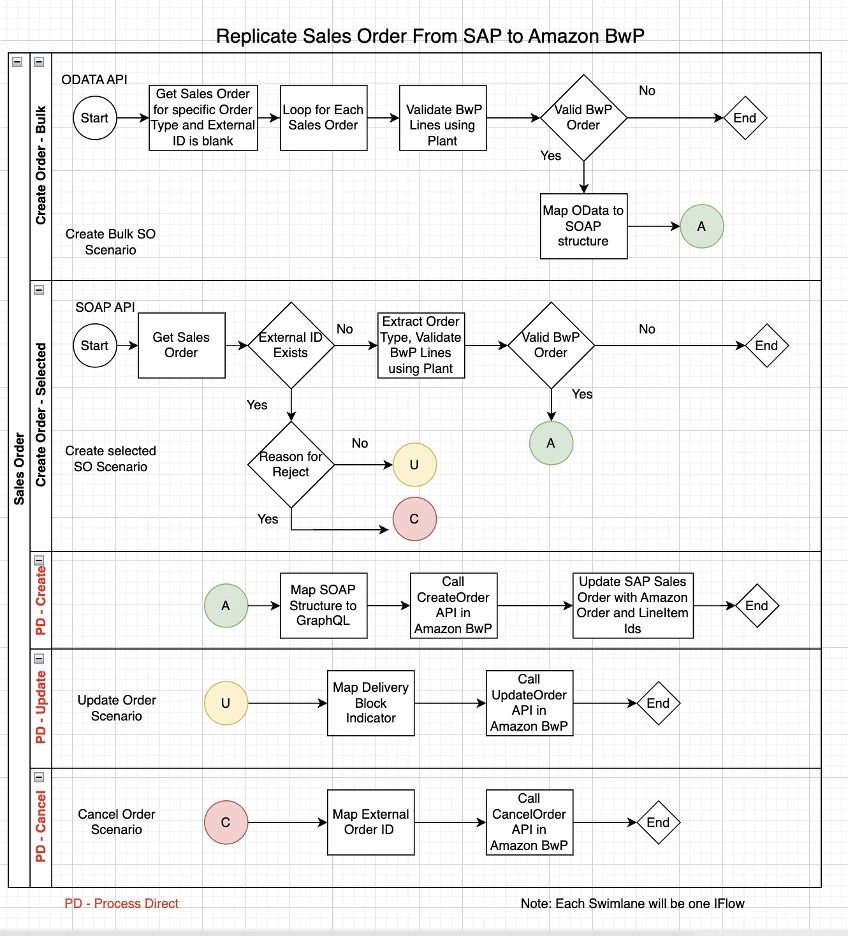
SAP S/4HANA replicates sales orders to Amazon either periodically or in real-time based on configuration. For new orders without an external ID, the system creates orders in Amazon with a "NOT_STARTED" status if shipment delivery is blocked, or with the "STARTED" status if not blocked, then updates SAP with the returned Amazon Order ID and Line-Item ID as external identifiers.
The Sync Selected Fulfillment Orders from SAP S/4HANA to Amazon flow is a real-time integration that uses a SOAP interface to listen for sales order messages from SAP S/4HANA. When a sales order is created or modified in S/4HANA, it triggers a SOAP call to Cloud Platform Integration (CPI), which receives the payload and validates key fields including fulfillment location, sales order type, and a specific text ID that serves as a control flag. Based on this validation, the flow determines whether the order should be created, updated, or canceled, then forwards the message to a central processing flow for transformation and interaction with Amazon Buy with Prime APIs.
The Sync All Fulfillment Orders from SAP S/4HANA to Amazon flow is a scheduled integration that fetches sales orders from SAP S/4HANA using an ODATA interface. It is configured to run and query orders that were created or changed within a specific time frame. The fetched data is then transformed into a standardized SAP SOAP format that aligns with the structure used by the real-time flow.
The Create Fulfillment Order in Amazon flow acts as the central processing component and receives messages from both the real-time and scheduled flows. This flow transforms the incoming data into the format required by Amazon Buy with Prime API and then triggers the order creation process. Once the order is successfully created on Amazon, the flow captures the response and updates the corresponding order in SAP S/4HANA.
The following table lists fulfillment APIs and events:
| Component Type | Name | Purpose |
|---|---|---|
| Amazon APIs | mutation: createOrder | Creates a new Amazon order. |
mutation: updateOrder | Updates order status. | |
| Amazon Events | N/A | - |
| SAP S/4HANA iFlow | Sync Selected Fulfillment Orders from SAP S/4HANA | Creates an Amazon order. |
| Sync All Fulfillment Orders from SAP S/4HANA to Amazon | Fetches and transforms orders. | |
| Create Fulfillment Order in Amazon | Processes order creation. |
Amazon fulfillment or shipment updates
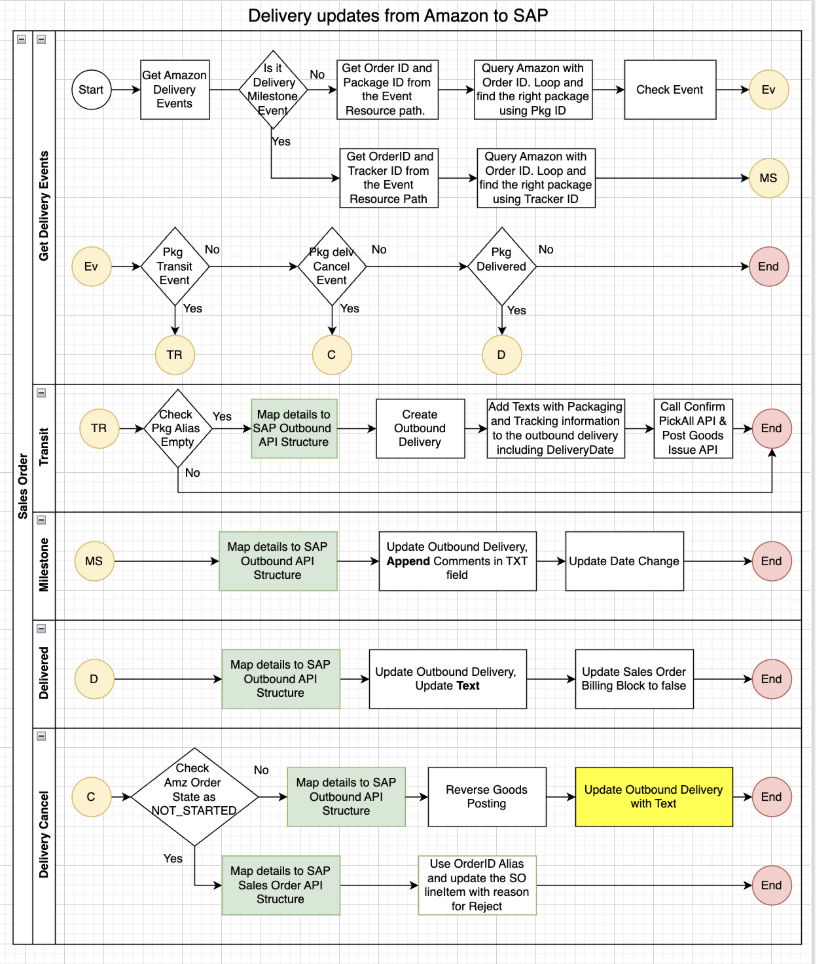
The Amazon Fulfillment Updates module processes event-based status updates from Amazon for package in-transit notifications, delivery confirmations, package location milestones, delivery attempts and failures, lost package notifications, and cancellations during transit. The interface receives Amazon package delivery event messages in JSON format from a common event processing iFlow. Upon receiving the input payload, the integration flow processes the event data and creates the corresponding outbound delivery document in SAP S/4HANA OMS. Once the outbound delivery is successfully created, the flow passes the delivery details to the update order flow to update the related sales order with the newly created outbound delivery information. Simultaneously, the interface updates the delivery date in the sales order to reflect the latest shipping timeline. In addition to these updates, the flow also creates shipping instructions and notifications to ensure all relevant shipping details are properly captured and updated in SAP S/4HANA OMS.
The following table lists shipment and delivery APIs and events:
| Component Type | Name | Purpose |
|---|---|---|
| Amazon APIs | get order | Retrieves delivery/package details. |
| Amazon Events | PACKAGE_DELIVERY_IN_TRANSIT | Indicates shipment started. |
PACKAGE_TRACKER_MILESTONE_CHANGED | Tracking number is updated. | |
PACKAGE_DELIVERED | Confirms delivery completion. | |
PACKAGE_DELIVERY_CANCELLED | Indicates delivery cancellation. | |
| SAP S/4HANA iFlow | Process Shipment Delivery Events | Processes delivery events. |
| Process Transit Event | Processes transit updates. | |
| Process Milestone Event | Processes milestone updates. | |
| Process Delivered Event | Processes delivery confirmation. | |
| Process Delivery Cancel Event | Processes delivery cancellation. |
Returns through Amazon (Amazon to SAP S/4HANA)
The Returns through Amazon module manages returns initiated from Amazon's Online Returns Center or Buy with Prime shopper order details page by automatically creating and managing return records in SAP S/4HANA to ensure real-time visibility and consistent returns status synchronization. When a shopper initiates a return through Amazon's portal, Amazon sends a return created event via secure webhook to the merchant's SAP S/4HANA, where the accelerator authenticates and validates the payload, maps Amazon return details (order ID, ASIN/SKU, quantity, reason code, return tracking) to SAP S/4HANA structures, and creates a return order record linked to the corresponding sales order.
Amazon provides return delivery status updates for in-transit, received, graded, refund requested, and closed returns. SAP S/4HANA captures these events and applies them to the return delivery record, enabling SAP S/4HANA to automatically generate credit memos or refunds, trigger workflows to notify finance, warehouse, or shopper service teams, and allow merchants to reconcile return inventory and settlement reports.
The following table lists Amazon return APIs and events:
| Component Type | Name | Purpose |
|---|---|---|
| Amazon APIs | get order | Retrieves return details. |
| Amazon Events | RETURN_STARTED | Indicates return initiation. |
RETURN_PACKAGE_IN_TRANSIT | Updates return shipment status. | |
RETURN_PACKAGE_DELIVERED | Confirms return delivery. | |
RETURN_ITEM_GRADED | Updates return item inspection status. | |
RETURN_COMPLETED | Indicates return completion. | |
RETURN_PACKAGE_DELIVERY_FAILED | Indicates return delivery failed. | |
| SAP S/4HANA iFlow | Process Return Events | Updates SAP S/4HANA return status. |
| Process Return Started Event | Processes return initiation. | |
| Process Return Transit Event | Processes return in-transit status. | |
| Process Return Delivered Event | Processes return delivery confirmation. | |
| Process Return Graded Event | Processes return item grading. | |
| Process Return Completed Event | Processes return completion. | |
| Process Return Failed Event | Processes return delivery failure. |
Returns outside Amazon for Amazon fulfilled items (S/4HANA to Amazon)
The Returns outside Amazon module manages returns initiated through channels other than Amazon (such as the merchant's SAP S/4HANA shopper service portal, point of sale, or internal return workflows). The accelerator notifies Amazon of all return activities to prevent duplicate authorization and maintain consistent return visibility across both SAP S/4HANA OMS and Amazon. When a return is initiated manually or programmatically within SAP S/4HANA, the Amazon MCF and Buy with Prime Accelerator for SAP S/4HANA OMS receives a new returns created notification (SAP DRF-OUT) from OMS. The accelerator validates the returns against the sales order information and transforms the return data into Amazon's required format (including order identifiers, item details, quantities, and return reasons) for the returns associated with Amazon orders and submits a return creation request to Amazon's Buy with Prime API.
The following table lists external return APIs and events:
| Component Type | Name | Purpose |
|---|---|---|
| Amazon APIs | mutation: updateOrder | Creates or updates return in Amazon. |
| SAP S/4HANA iFlow | Sync Returns | Creates return in Amazon. |
Amazon refund requests (Amazon to SAP S/4HANA)
The Amazon Refund Requests module manages refund notifications initiated by Amazon for successful shopper returns, order cancellations after payment, and delivery failures or lost packages, ensuring that refund events are automatically processed in SAP S/4HANA to keep financial records and shopper transactions synchronized. When Amazon triggers a refund notification through a webhook, the Amazon MCF and Buy with Prime Accelerator for SAP S/4HANA OMS authenticates and validates the incoming event, maps the Amazon order and item details to the corresponding SAP S/4HANA transaction, determines the appropriate refund amount and tax components, and automatically creates the corresponding financial transaction (such as a credit memo for returns and delivery failures or a return invoice) linked to the original sales order.
After SAP S/4HANA creates the refund transaction (credit memo), standard SAP S/4HANA workflows or payment gateway integrations execute the actual payment refund, the system logs refund details in the SAP S/4HANA audit log for traceability and reconciliation, and merchants can optionally trigger notifications to shoppers or finance teams.
The following table lists refund request APIs and events:
| Component Type | Name | Purpose |
|---|---|---|
| Amazon APIs | mutation: updateOrder | Updates refund status in Amazon. |
query: order | Queries refund details. | |
| Amazon Events | REFUND_REQUESTED | Triggers refund processing. |
| SAP S/4HANA iFlow | Process Refund from Amazon | Creates refund (credit memo) on SAP S/4HANA. |
Synchronize issued refunds (SAP S/4HANA to Amazon)
The Synchronize Issued Refunds module manages refunds initiated in SAP S/4HANA and ensures that Amazon receives accurate refund status and details after a refund payment is processed and completed within SAP S/4HANA. SAP S/4HANA creates a refund transaction (credit memo) due to shopper return processing, order cancellation after invoicing, or manual refund adjustments. The accelerator syncs refunds on a schedule by processing refund updates (full and partial refunds) in SAP S/4HANA at scheduled intervals, validating their association with an Amazon order, retrieving the corresponding Amazon order ID and refund mapping data, and sending the refund confirmation to Amazon through the Amazon Buy with Prime order update API.
The following table lists refund synchronization APIs and events:
| Component Type | Name | Purpose |
|---|---|---|
| Amazon APIs | mutation: updateOrder | Updates refund status in Amazon. |
| SAP S/4HANA iFlow | Synchronize Issued Refunds | Creates and updates refunds. |
Merchant order cancel (SAP S/4HANA to Amazon)
The Merchant Order Cancel module enables merchants to initiate order cancellations for Buy with Prime or Multi-Channel Fulfillment (MCF) orders directly from SAP S/4HANA OMS or other connected merchant systems for reasons such as out-of-stock items, payment failures, or manual administrative actions, ensuring that cancellation requests are validated, transmitted, and synchronized between SAP S/4HANA OMS and Amazon to maintain transactional accuracy.
When a cancellation is initiated in SAP S/4HANA OMS, the Amazon MCF and Buy with Prime Accelerator for SAP S/4HANA OMS validates the request by identifying eligible orders in "Pending Fulfillment" status that have not yet been shipped, links the cancellation to an Amazon order, extracts order identifiers and reason codes, and confirms no conflicting fulfillment or refund events are in progress before communicating the cancellation request to Amazon through the Amazon order cancellation API.
After receiving Amazon's response (accepted, partially accepted, or rejected), the accelerator updates the order status and related records in SAP S/4HANA OMS to reflect the final cancellation state, stores all API request and response details in the SAP S/4HANA audit log for traceability and reconciliation, and triggers error notifications and retry logic for any failed or partial cancellations.
The following table lists order cancellation APIs and events:
| Component Type | Name | Purpose |
|---|---|---|
| Amazon APIs | mutation: cancelOrder | Requests to cancel an Amazon order. |
| SAP S/4HANA iFlow | Process Order Cancel | Cancels and updates orders. |
Synchronize inventory (Amazon to S/4HANA)
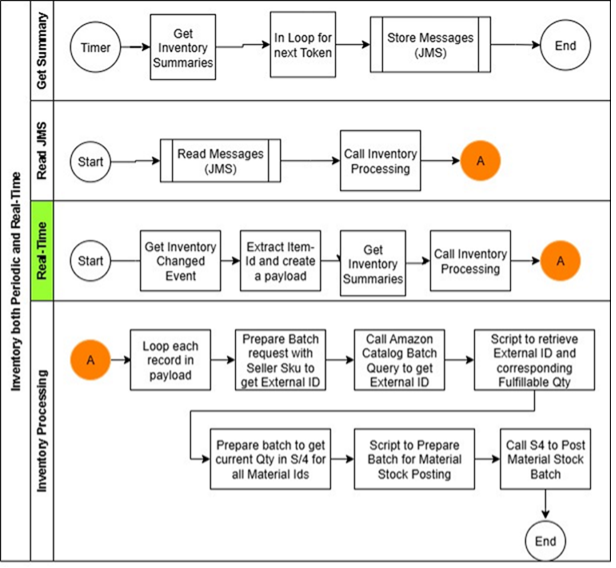
The Inventory Synchronization module maintains inventory alignment between Amazon and SAP S/4HANA IMS for Multi-Channel Fulfillment (MCF) and Buy with Prime operations. The module uses real-time updates triggered by Amazon events when stock levels change and scheduled sync that retrieves complete inventory snapshots from Amazon at defined intervals.
When Amazon triggers an inventory change event for individual SKUs due to stock changes in its fulfillment centers (from sales, returns, or restocks), the Amazon MCF and Buy with Prime Accelerator for SAP S/4HANA receives and validates the event payload, matches the incoming Amazon SKU or ASIN with the corresponding SAP S/4HANA item, normalizes inventory data to SAP S/4HANA's structure, and updates the corresponding item record in SAP S/4HANA by adjusting available quantities and location-specific inventory levels while recording the transaction as an inventory adjustment or bin transfer and flagging it as originating from Amazon for audit purposes.
The accelerator runs a scheduled batch process to reconcile full inventory data by retrieving complete inventory snapshots for all merchant SKUs from Amazon at defined intervals, comparing Amazon's data with SAP S/4HANA's records to correct any mismatches, and ensuring SAP S/4HANA reflects the true available-to-sell quantities across all connected fulfillment centers. The SAP S/4HANA accelerator uses JMS Queue and multi-threading to process bulk inventory updates from the getInventorySummaries API in parallel. Merchants can configure the number of parallel threads for inventory update processing based on their SAP S/4HANA setup.
The following table lists real-time inventory change APIs and events:
| Component Type | Name | Purpose |
|---|---|---|
| Amazon APIs | getInventorySummaries | Get fulfillable quantity for seller SKU. |
| Amazon Events | INVENTORY_CHANGED | Triggered on inventory availability change. |
| SAP S/4HANA iFlow | Process Real-Time Inventory Updates | Adjust inventory on SAP S/4HANA. |
The following table lists periodic inventory full-sync APIs:
| Component Type | Name | Purpose |
|---|---|---|
| Amazon APIs | getInventorySummaries | Get fulfillable quantity for seller SKU. |
query: Products | Get external ID for seller SKU. | |
| SAP S/4HANA iFlow | Process Inventory Bulk Updates | Adjust inventory on SAP S/4HANA. |
Installation and deployment overview
Prerequisites
Complete the following prerequisites before deploying the accelerator:
-
Activate SAP BTP Account, SAP Integration Suite, and SAP Cloud Integration service.
-
Configure the SAP Cloud Connector and connect it to the SAP BTP Account.
-
Install SAP S/4HANA Cloud Private Edition 2023 and connect it to SAP Cloud Connector and SAP Integration Suite. Activate required APIs mentioned in the API section for your iFlows.
-
Obtain access and security credentials for the following Amazon systems and APIs:
a. Multi-Channel Fulfillment (MCF) and Buy with Prime for order processing.
b. Selling Partner (SP) for inventory processing.
-
Synchronize master data related to catalog or material between SAP and Amazon. The SAP S/4HANA accelerators documentation describes API calls and process flows for inventory sync, order, delivery, returns, and refunds between SAP and Amazon. Enhance iFlows based on merchant-specific OMS and IMS configurations as needed.
The accelerator supports deployment across SAP S/4HANA development, test, and production environments. Follow your organization's SAP development methodology to develop, test, and promote the accelerator through each environment.
Deployment
We recommend a two-phase deployment approach to ensure stability and configuration consistency:
Phase 1: Test environment deployment
-
Install the accelerator iFlows in the SAP S/4HANA BTP Integration Suite tenant development and test environment.
-
Configure accelerator settings including API endpoints, tokens, and merchant preferences as detailed in the installation guide.
-
Validate integration flows, including order synchronization, fulfillment, inventory, returns, and refund updates.
-
Identify configuration gaps, field mapping issues, or Groovy script governance adjustments needed for production deployment.
Phase 2: Production deployment
-
Migrate validated configurations and custom records to the production account.
-
Reconnect to live Amazon APIs using production credentials.
-
Conduct final end-to-end testing to confirm data accuracy and performance alignment with merchant operational requirements.
Updated 9 months ago