
Amazon MCF and Buy with Prime Accelerator for Oracle Fusion OMS
Buy with Prime API is now available for early access
Sign up for early access to the Buy with Prime API using the 'Sign Up' button below. The API may change as Amazon receives feedback and iterates on it.
You can use the Amazon MCF and Buy with Prime Accelerator for Oracle Fusion OMS to integrate Multi-Channel Fulfillment (MCF) and Buy with Prime with your Oracle Fusion order management system (OMS). The following sections describe the technical requirements, solution architecture, implementation modules, and deployment considerations for the accelerator.
Accelerator benefits
The Amazon MCF and Buy with Prime Accelerator for Oracle Fusion OMS reduces integration time and technical complexity while automating synchronization of business data. Use the accelerator to implement Amazon commerce capabilities without extensive modifications to your existing inventory management, order processing, fulfillment tracking, and cancellation handling systems. This approach lets development teams focus on merchant-specific customizations instead of building core integration components.
Solution overview
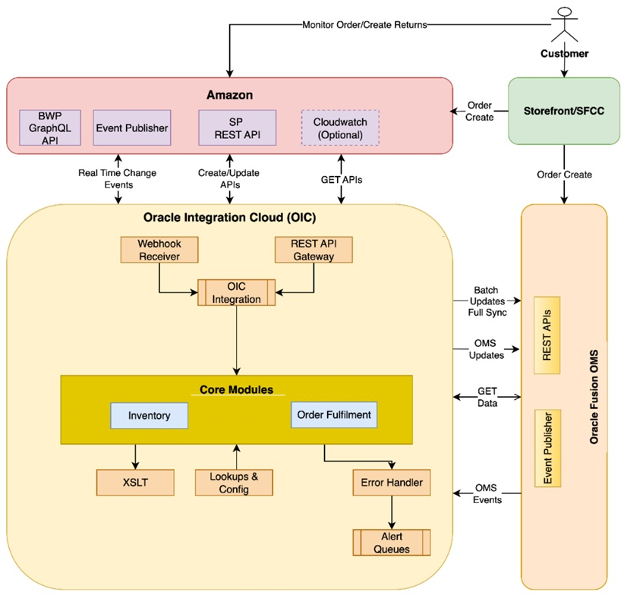
The Amazon MCF and Buy with Prime Accelerator for Oracle Fusion OMS processes data asynchronously without disrupting your existing Oracle Fusion OMS operations. The accelerator manages data transformations and maintains state consistency between Amazon services and your OMS, adding Amazon fulfillment capabilities while preserving existing workflows.
The accelerator provides integration with Amazon Buy with Prime APIs, which also support MCF. The accelerator is hosted within your existing Oracle Integration Cloud (OIC) private cloud account where you manage your OMS and Inventory Management System (IMS). Merchants using Oracle Fusion as their primary Order Management System can use this accelerator with any storefront technology stack.
Use cases
The following table describes several use cases for the Amazon MCF and Buy with Prime Accelerator for Oracle Fusion OMS:
| Use Case | From | To | Description |
|---|---|---|---|
| Amazon Inventory Updates | Amazon | Oracle | Syncs inventory in real-time and batches from Amazon to Oracle Fusion, ensuring accurate stock/inventory levels. |
| Amazon Fulfillment Status Update | Amazon | Oracle | Updates Oracle Fusion with shipping and tracking info, delivery cancellations, and delivery failures from Amazon. |
| Order Cancellations through Amazon | Amazon | Oracle | Updates Oracle Fusion with order cancellation information from Amazon. |
| Order Cancellations outside Amazon | Oracle | Amazon | Updates Amazon with order cancellation information from Oracle Fusion. |
| Fulfill with Amazon | Oracle | Amazon | Creates and manages Amazon Buy with Prime and MCF orders from Oracle Fusion. |
Because the accelerator integrates with Buy with Prime APIs rather than MCF Seller Partner APIs, it does not support certain MCF features including fulfillment policies, blank box shipping, and the ability to block Amazon Logistics (AMZL). The next version of this accelerator will include Returns and Refund modules with Oracle API implementation, replacing Business Intelligence Publisher (BIP) reports for improved order processing performance.
Implementation modules
The Amazon MCF and Buy with Prime Accelerator for Oracle Fusion OMS uses several modules to integrate Amazon services with Oracle Fusion OMS. These modules handle order management, fulfillment, cancellations, and inventory synchronization. Each module uses specific APIs and event triggers to maintain data consistency between systems.
The following table lists the modules supported by the accelerator and data flow between systems for each module:
| Accelerator Module | Data Exchange |
|---|---|
| Synchronize Inventory | Amazon → Oracle |
| Fulfill with Amazon | Oracle → Amazon |
| Amazon Fulfillment Updates | Amazon → Oracle |
| Order Cancellation by Amazon | Amazon → Oracle |
| Order Cancellations by Oracle | Oracle → Amazon |
Fulfill with Amazon
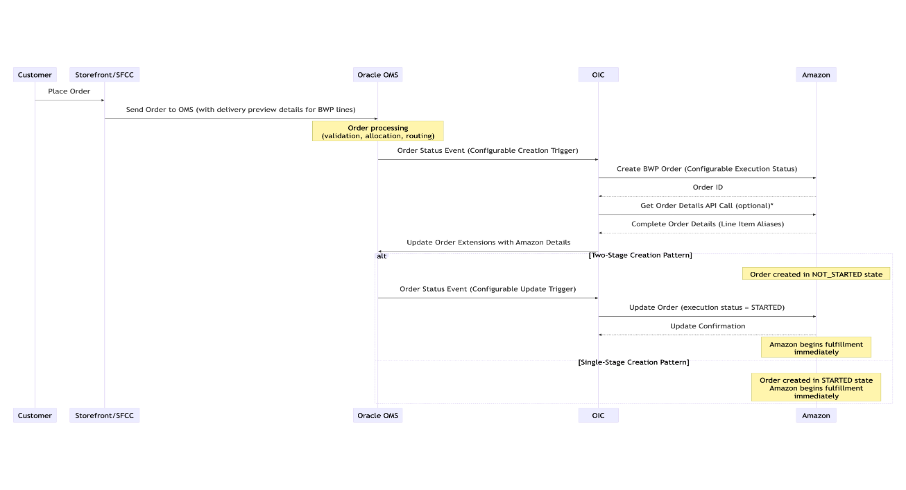
This module creates Amazon orders when new orders with Buy with Prime or MCF line items are created in Oracle Fusion OMS. The accelerator validates the order, calls the Amazon create order API, and updates the Oracle sales order with the corresponding Amazon order ID.
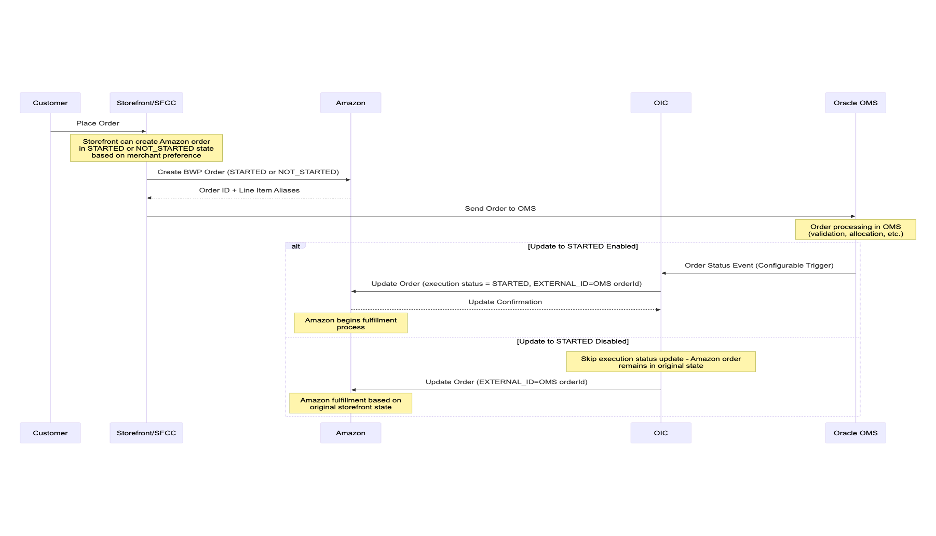
The accelerator supports two order creation scenarios. For orders originating in Oracle Fusion OMS, the accelerator creates the Amazon order and updates Oracle with the Amazon order ID. For orders from merchant storefronts that already have an Amazon order ID, the accelerator updates the order status to STARTED and adds the Oracle OMS order ID to the Amazon order.
The following table lists fulfillment APIs and events:
| Component Type | Name | Purpose |
|---|---|---|
| Amazon APIs | mutation: createOrder | Creates Amazon order. |
mutation: updateOrder | Updates order status. | |
| Oracle Integration Cloud (OIC) API | Get Order API, Update Sales Order API, Oracle BIP reports (/fscmRestApi/resources/11.13.18.05/salesOrdersForOrderHub – GET and PATCH) | Creates and updates Amazon orders. |
The following diagrams illustrate both order creation scenarios:
Order creation from Oracle Fusion OMS
Order creation from storefront
Amazon fulfillment updates
This module tracks order delivery in real-time by processing event-based status updates from Amazon, including package in-transit notifications, delivery confirmations, location milestones, delivery attempts and failures, lost package notifications, and cancellations during transit.
When Amazon sends a delivery event, the module processes the event data and creates an outbound shipment record in Oracle Fusion OMS. The module then updates the related sales order with shipment details, tracking information, and delivery timeline.
The following table lists shipment and delivery APIs and events:
| Component Type | Name | Purpose |
|---|---|---|
| Amazon APIs | query: order | Retrieves delivery/package details. |
| Amazon Events | PACKAGE_DELIVERY_IN_TRANSIT | Indicates shipment started. |
PACKAGE_TRACKER_MILESTONE_CHANGED | Tracking number updated. | |
PACKAGE_DELIVERED | Confirms delivery completion. | |
PACKAGE_DELIVERY_CANCELLED | Indicates delivery cancellation. | |
| Oracle Integration Cloud (OIC) API | Process Shipment Delivery Events, Process Transit Event, Process Milestone Event, Process Delivered Event, Process Delivery Cancel Event, Oracle BIP reports (/fscmRestApi/resources/11.13.18.05/shipmentLines, /fscmRestApi/resources/11.13.18.05/shipmentLineChangeRequests, /fscmRestApi/resources/11.13.18.05/orderPromises) | Process delivery events. |
Merchant order cancellation
This module lets merchants cancel Buy with Prime or MCF orders from Oracle Fusion OMS or other connected merchant systems. Common cancellation reasons include customer remorse, out-of-stock items, payment failures, or manual administrative actions.
When a merchant initiates a cancellation, the accelerator validates that the order is in "Pending Fulfillment" status and has not yet shipped. The accelerator then sends the cancellation request to Amazon with the order identifiers and reason codes.
Based on the API response (accepted, partially accepted, or rejected), the accelerator updates the order status in Oracle Fusion OMS to reflect the final cancellation state. The system logs all API requests and responses in the Oracle Fusion Audit Log and triggers error notifications and retry logic for failed or partial cancellations.
The following table lists order cancellation APIs and events:
| Component Type | Name | Purpose |
|---|---|---|
| Amazon APIs | mutation: cancelOrder | Cancels Amazon order. |
| Oracle Integration Cloud (OIC) API | Update Sales Order API, Oracle BIP reports (/fscmRestApi/resources/11.13.18.05/salesOrdersForOrderHub – PATCH) | Processes order cancellations. |
Synchronize inventory
This module keeps inventory aligned between Amazon and Oracle Fusion IMS for MCF and Buy with Prime operations. The module uses two synchronization methods. Real-time updates respond to Amazon inventory events, while scheduled batch processes retrieve complete inventory snapshots.
When Amazon triggers an inventory update event (from sales, returns, or restocks), the accelerator receives the event and matches the Amazon SKU or ASIN to the corresponding Oracle Fusion IMS item. The accelerator then updates the item quantities and location-specific inventory levels in Oracle Fusion IMS.
The scheduled batch process retrieves complete inventory snapshots from Amazon at defined intervals and compares them with Oracle Fusion IMS records to correct any mismatches. This ensures Oracle Fusion reflects accurate available-to-sell quantities across all connected fulfillment centers.
The following table lists real-time inventory change APIs and events:
| Component Type | Name | Purpose |
|---|---|---|
| Amazon APIs | getInventorySummaries | Retrieves fulfillable quantity for seller SKU. |
| Amazon Events | INVENTORY_CHANGED | Triggered on inventory availability change. |
| Oracle Integration Cloud (OIC) API | Process Real-Time Inventory Updates | Adjusts inventory on Oracle Fusion IMS. |
The following table lists periodic inventory full-sync APIs:
| Component Type | Name | Purpose |
|---|---|---|
| Amazon APIs | getInventorySummaries | Retrieves fulfillable quantity for seller SKU. |
query: Products | Retrieves external ID for seller SKU. | |
| Oracle Integration Cloud (OIC) API | Process Inventory Bulk Updates | Adjusts inventory on Oracle Fusion IMS. |
Installation and deployment overview
Before deploying the accelerator, ensure you have the required credentials and configured systems. Deploy in two phases to validate configurations in a test environment before moving to production.
For details on the available configuration settings, see Amazon MCF and Buy with Prime Accelerator for Oracle OMS on the Nextuple website.
Prerequisites
Amazon credentials
You need the following Amazon credentials:
- Business Product ID/Target ID: Unique identifier for merchant's Buy with Prime setup.
- Client ID and Client Secret: For Amazon Selling Partner API and Buy with Prime GraphQL access.
- Marketplace IDs: Target marketplace identifiers (such as ATVPDKIKX0DER for US).
- Refresh Token: For automated token management.
Oracle OMS access
Configure Oracle Fusion OMS access:
- OMS Environment URL and Credentials: Oracle Fusion Cloud environment endpoint.
- Service Account: With inventory management and API access privileges.
- BIP Report Access: Permissions to execute custom inventory reports.
- Webhook credentials: OAuth details from OIC for receiving the events from Amazon.
OIC environment
Set up Oracle Integration Cloud:
- OIC Instance: Provisioned Oracle Integration Cloud environment.
- Admin Access: For deploying integrations and configuring connections.
- Lookup Management: Permissions to create or modify lookup tables.
Inventory and subinventory organization configuration
Configure Oracle Fusion OMS inventory organizations:
- Create dedicated inventory and subinventory codes for Amazon Multi-Channel Fulfillment inventory if not already configured.
- Configure subinventory attributes for reservable/non-reservable inventory types.
- Set up locator controls and inventory validation rules.
- Define cost accounting parameters for Amazon-fulfilled inventory.
- Update the details to
Amazon_BwP_Merchant_Detailslookup. - Validate inventory and subinventory organizations are created in OMS.
Database configuration (optional)
- Oracle ATP (Autonomous Transaction Processing): Database credentials for connecting to Oracle OMS, required for idempotency checks to prevent duplicate order processing.
Deployment
Deploy the accelerator in two phases:
Phase 1: Test environment deployment
- Deploy to your OIC test environment to validate configurations before production.
- Install the accelerator workflows in the OIC test environment.
- Configure accelerator settings (such as API endpoints, tokens, and merchant preferences) as detailed in the installation guide.
- Validate integration flows, including order synchronization, fulfillment, inventory, returns, and refund updates.
- Identify configuration gaps and field mapping issues needed for production deployment.
Phase 2: Production deployment
- Deploy to production with live credentials after successful test validation.
- Migrate validated configurations and custom records to the production account.
- Reconnect to live Amazon APIs using production credentials.
- Conduct final end-to-end testing to confirm data accuracy and performance alignment with merchant operational requirements.
Related topics
Updated 8 months ago